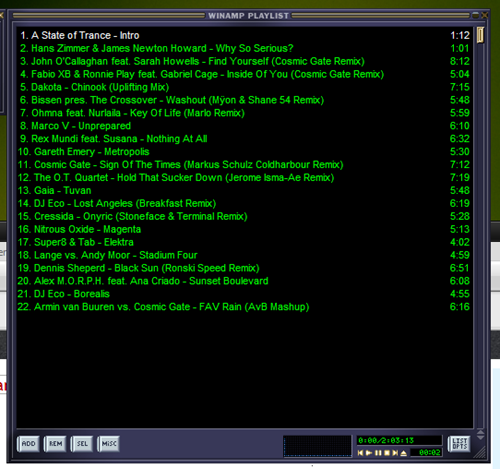
Listen to A State of Trance in Winamp using CUE Sheet
Written by dawgama on 7/06/2009 09:13:00 AM1. Download the CUE Player 0.57c for Winamp 5.x
2. Download the CUE Sheet(Playlist) from this Blog (ALL CUE for ASOT)
4. Copy the CUE sheet in a folder where you have your ASOT-411.mp3
3. Right-click and chose open in Notepad
4. Replace
FILE"Armin_van_Buuren_presents_-_A_State_of_Trance_Episode_411__Recorded_Live_.mp3" MP3
with the name of your mp3 file. Eg. FILE “ASOT-411.mp3” MP3
5.Chose File> Save
6. Double Click to Open in Winamp.
Aboneaza-te printr-un RSS reader
Trimiteţi un comentariu
Am inlaturat tagul rel=”nofolow” de la comentarii pentru a beneficia de un backlink atunci cand lasi un comentariu pe blog.
pentru a beneficia de backlink lasa un link de tipul http://www.blog.com NU www.blog.com
Comentariul tau poate fi oprit pentru moderare. In principiu, va fi aprobat. Nu e nevoie sa postezi din nou. Rog sa se respecte regulile de bun simt.
Imi rezerv dreptul de a sterge orice comentariu.
Poti comenta si pe celalat Blog unde am inlaturat tagul rel="nofolow"
| Posted in »


4 comments: Responses to “ Listen to A State of Trance in Winamp using CUE Sheet ”
By Andreea Gheorghe on 07 iulie 2009 12:24
Interesanta metoda de a asculta fisiere CUE pe un site.
By Andreea Gheorghe on 13 iulie 2009 17:39
I didn't know about the CUE Sheet solution, thanks for sharing this.
By credit ipotecar on 24 iulie 2009 16:57
Deci pentru asta sunt fisierele .cue. Habar nu aveam.
By Andreea on 27 iulie 2009 13:09
Mersi de folutie, am de gand s-o folosesc. :)